Get ahead of your competitors.
Training, payments, payment reminders, advertising, sales, team: everything you track in your company, in one dashboard built and set up for you.
Do better than your competitors, with the same team.
In finance, alpha is what an investment earns above its market. For a company, it is the same idea: doing better than the others with the same resources. Every morning, Alpha IA shows you what is bringing in money and what is stuck, and the follow-up that used to slip through the cracks gets done.
Take only the modules you need.
Tick your modules to see your dashboard and the accounts to connect to it. In your dashboard, a module is switched on with a simple setting, and a module that is switched off disappears.
Getting paid
Selling
Attracting customers
Training and looking after customers
Organising the team
The real screens.
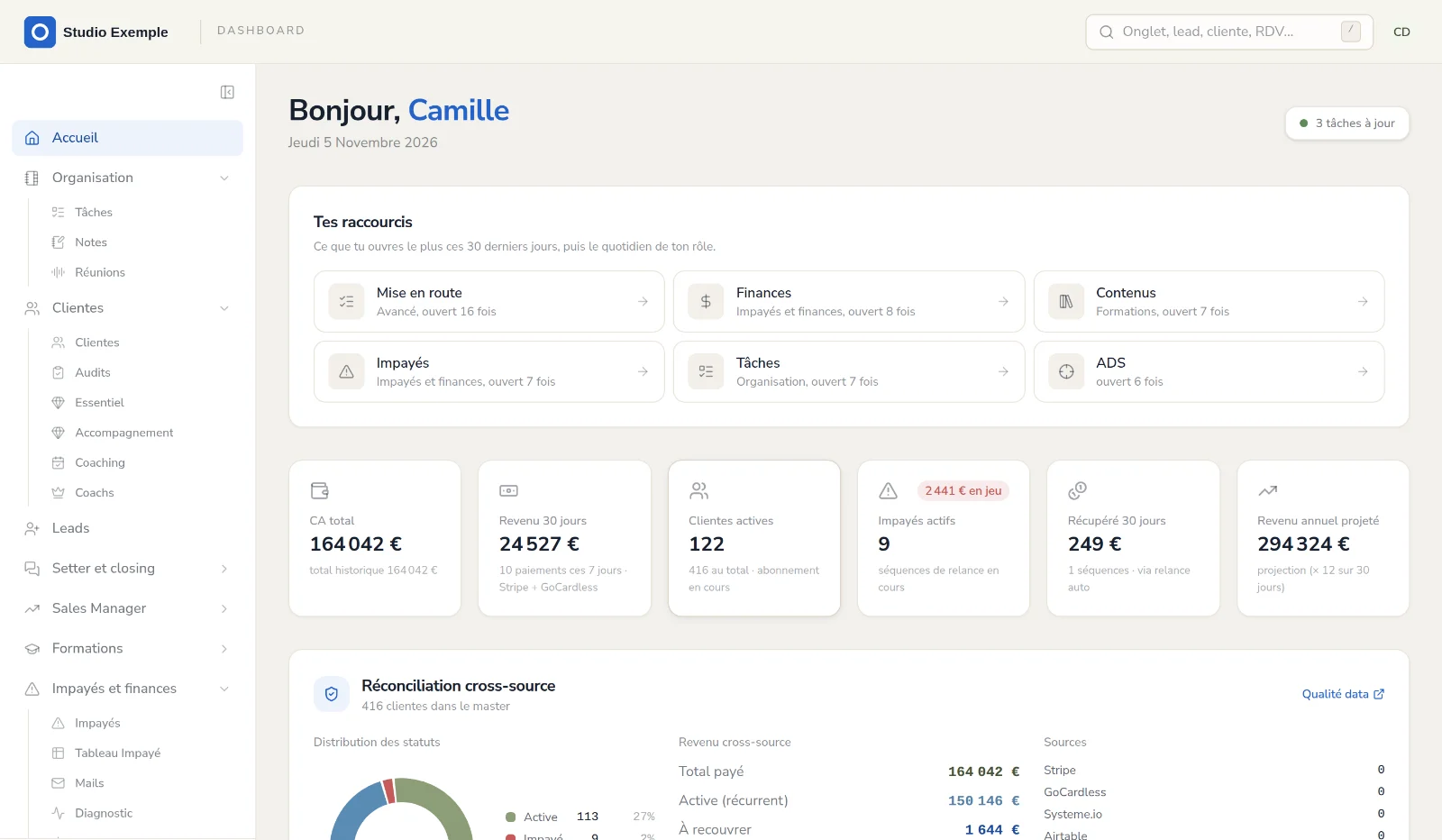
Screenshots of the example dashboard, on a fictitious company (“Studio Exemple”) with made-up data. The dashboard interface is in French.
AI works inside your modules.
It prepares the work that takes your team time. You set a monthly budget, and it stops when the budget is reached.
What it already does
- A draft answer to your students' questions.
- A summary of an appointment and the minutes of a meeting.
- A score for each of your ads.
- A big task broken down into steps.
Your agent coming soon
- An agent of your own, connected to your data: your tasks, appointments, sales and ad figures.
- It never has access to the keys of your accounts.
We set everything up for you.
An audit of your company.
We look at how you sell, get paid and work, and we choose your modules together.
Your brand, with no form to fill in.
We take your logo, colours and offers from your websites.
Your dashboard, at your own address.
It runs on your own database, separate from other companies', at an address like your-company.alphaia.fr.
Your team invited.
Everyone receives a link to choose their password, with the role that fits their job.
You connect your accounts.
Stripe, Meta and the others, from the “Getting started” page. Your keys are encrypted, and no email, text or reminder is sent until you switch sending on.
A 30-minute walkthrough, then a check-in a week later.
We test everything with you, then come back after a week to see what needs adjusting.
Your whole team pulling the same way.
Everyone has their own account, with a role that fits their job: management, administration, team, sales, coaches. A salesperson sees their portal, a coach their students, and you see everything.
- A log of actions and sign-insYou know who did what, and when.
- Tasks and meetings next to the numbersThe day's priorities are set in front of the right numbers.
Your data stays yours.
- One database per companyYour data is never mixed with another company's.
- Encrypted keysThe keys to your accounts (Stripe, Meta…) are encrypted, with a master key unique to your dashboard.
- Hosted in ParisYour dashboard's server and database are in Paris.
- Your data can be exported at any timeCustomers, sales, payments, tasks, notes and appointments, as files you open in a spreadsheet.
- Your accounts stay in your nameStripe, Meta, Brevo: the dashboard connects to them, it does not replace them.
Start with an audit.
We look at your company and tell you which modules would save you time and money, and what your dashboard would cost.
Your questions
How much does a dashboard cost?
The price depends on the modules you choose. You know it at the end of the audit, before you commit.
Do I have to leave my current tools?
No. Your Stripe, Meta or Brevo accounts stay yours: the dashboard connects to them.
Do I need Google Workspace?
Only for some modules: booking, the team calendar, customer service and closing. The others work without it.
Can I add a module later?
Yes. Every module is already in your dashboard: adding one is a setting, not new development.
Can a message go out on its own?
Not until you decide: sending is switched off at setup. No email, text or reminder goes out until you switch it on.
Who sees my data?
You and the people on your team you give an account to. Your database is kept apart, and the keys to your accounts are encrypted.